Business Digital Banking Upgrade

A redesigned business digital banking experience is coming soon!

 
Improved functionality helps you spend less time on banking and more time growing your business. Your online and mobile banking experience will be more powerful, intuitive, and built for the way you work.

Online & Mobile Banking Upgrade Resource Center

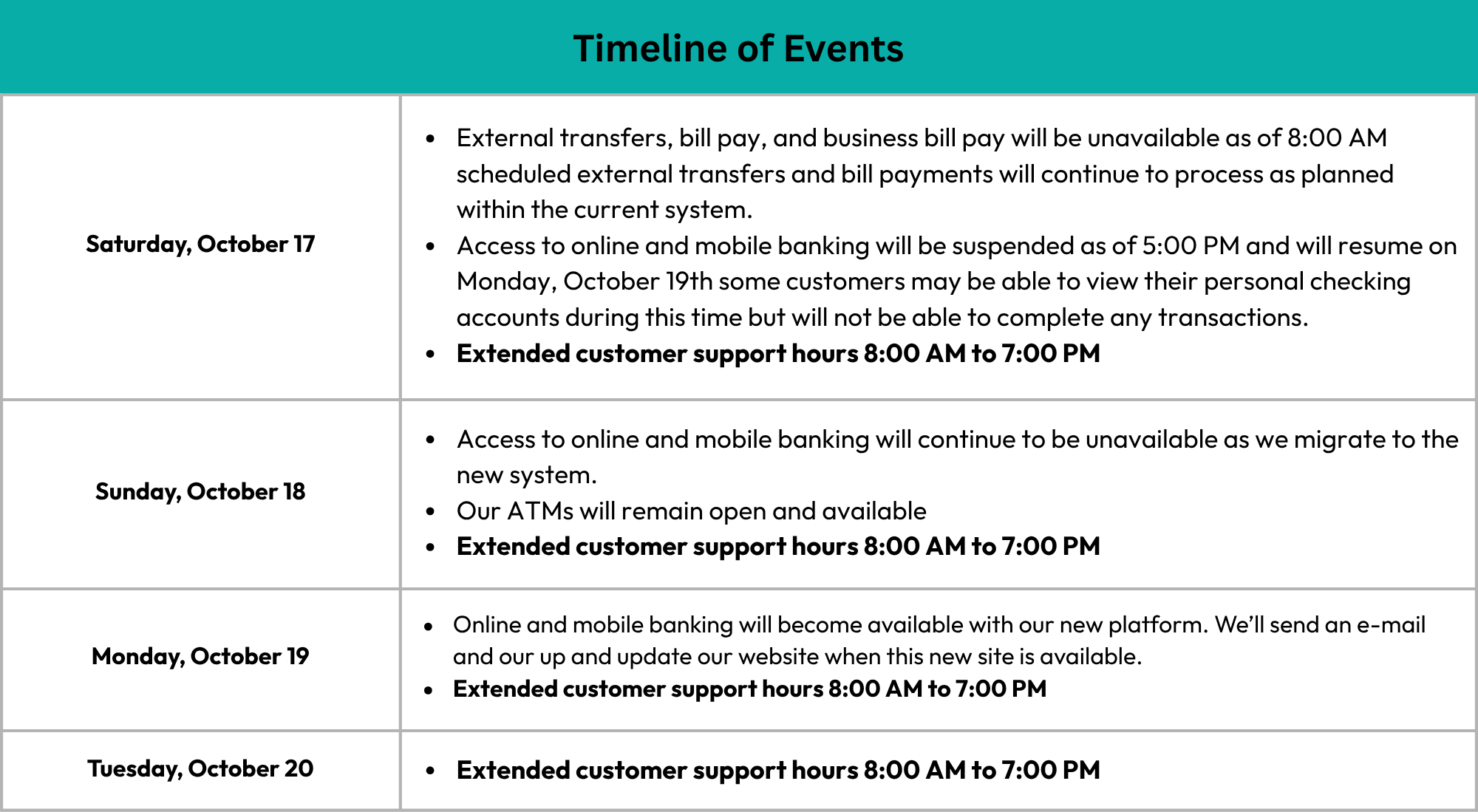
This is your resource for everything you need to know about the upcoming online and mobile banking upgrade, including the timeline of events and frequently asked questions.  

Why We're Making This Change

We understand life is busy and convenience is important. Our new digital banking platform will offer seamless banking solutions built for the way you want to bank, whether you are at home or on the go, no matter the account.

The new system will combine Personal & Business Online Banking into one easy-to-access platform that will feature the essential tools you use today with friendlier navigation, enhanced security, a new mobile banking app, and more.  
 

What Do I Need To Do Now?

All business customers were mailed a letter on September 14th.

Get ready in just a few steps:

  • Update your contact information
  • Make sure you know username and password
 
Have additional questions? Our Customer Support team is available at 402-434-2265. 
Monday-Friday, from 8:30am-5:00pm, and Saturday, 8:30am-12:30pm. 


    FAQs

    When will the change take place?
    The upgrade will take place the week of September 6, 2026, with a target launch date of October 19, 2026.
     
    Is there anything I need to do to prepare for this change?
    Yes! There are 2 things that you can do prior to the go-live date:
    • It’s important that we have your current phone number and email address on file. Please review and update this information within your Business Online Banking Profile as soon as possible to ensure a smooth first-time login.
    • Make sure you know your current username and password, even if you use biometrics to log in to your account—you will need this information when you log in to the system the first time after the launch. 
     
    What if I don’t know my Username or Password? 
    If you are unsure of your Username, contact us at 402-434-2265 for assistance. If you are unsure of your Password, you can easily reset it by selecting “Forgot Password” from the respective login screen and following the on-screen prompts.
     
    Do you anticipate any downtime with the current system?
    Yes, as we migrate to the new platform, we expect that access to the existing system will be unavailable from Tuesday, September 8 through Thursday, September 10. Refer to the Timeline of Events for details.
     
    What will happen with External Transfers and Bill Pay during the conversion?
    Scheduled external transfers and bill payments will continue to process as planned within the current system. Be sure that you schedule all external transfers and bill payments prior to September 6th as you will not be able to access your online account during the conversion.
     
    What are some enhancements I can expect with this upgrade?
    This upgrade will bring a more connected banking experience for both personal and business users. The enhanced platform will offer one convenient login page and a single mobile app for all banking needs. Customers will also benefit from a more intuitive design, secure messaging within online banking, enhanced debit card controls including travel notices and purchase restrictions, and continued access to the services they rely on today, including Bill Pay, external transfers, mobile deposit, ACH, wires, Merchant Capture, and Positive Pay.
    Will the business online banking login change?
    When you log in to the new system, you will no longer need to select the 'Business Banking' drop down. Your Username and Password will remain the same. If you are a soft token user (digital), you'll be required to download the new digipass application to complete token enablement prior to login. If you are a hard token user, you will need to complete a token enablement prior to login.
     
    Are any of my business account details not being transferred to the new system?
    Your internal transfer templates and ACH/Wire history and alerts will not transfer to the new system. Please save any existing templates and history before September 6, 2026. Internal transfer templates and alerts will need to be reestablished again once the new system is live. 
     
    Do I need to be aware of any action items regarding my ACH/Wire Templates?
    Yes, we recommend saving third party customer information for each unique ACH/Wire file you have set up if you have not done so prior to September 6, 2026, as the “Copy” feature is not supported within the new system. Any scheduled or recurring ACH/Wire payments dated between September 8-10 will not be sent and will need to be setup once you have gained access to the system on September 10.
     
    What action items should I consider post-upgrade?
    You will need to re-establish your Internal Transfer Templates. These will not transfer over from the current system. Please be sure to review your account details carefully to ensure everything transferred correctly. Pay close attention to your Bill Pay payee information, scheduled payments and internal transfers, and any migrated ACH/Wire templates and participants prior to scheduling any new batches, transfers, or payments. Positive Pay users may need to create new templates.
     
    Is Business Bill Pay changing? 
    Yes, Bill Pay will only be accessible through your online account and will no longer be available through the mobile app. 
     
    Do you offer Zelle® for Small Businesses?
    Zelle is not currently available to our business customers. However, the new platform will enable us to provide Zelle for Small Business capabilities in the future—this migration is a foundational step in supporting our ability to offer you this functionality.
     
    Who can I contact for more information?
    You can reach out to Customer Support at 402-434-2265 with any questions.

    Will this upgrade affect the Mobile Banking app?
    Yes, we will be launching a NEW Mobile Banking app as part of the upgrade that allows both personal and business account holders to access their accounts from one easy-to-use app. Business users will need to download the new app and personal users will see an app refresh. The new app will be available for download after September 10. Note that business customers will no longer have access to Bill Pay from the mobile app and will need to schedule their bill payments using their online account.
     
    What if I use biometrics to log in via the Mobile Banking app?
    If you utilize biometrics to access your accounts via our Mobile Banking app, you will need to be sure you know your User ID and Password prior to our go-live date. You will be required to enter these within the new app the first time you log in. After you have logged in, you can reestablish your biometrics for future logins.


    The upgraded platform features enhanced functionality and convenience of accessing both personal and business accounts through one digital banking platform. To learn more about the personal banking experience, visit the Personal Digital Banking Upgrade Resource Center.